Free for Mac and Windows
Your computer,
on autopilot.
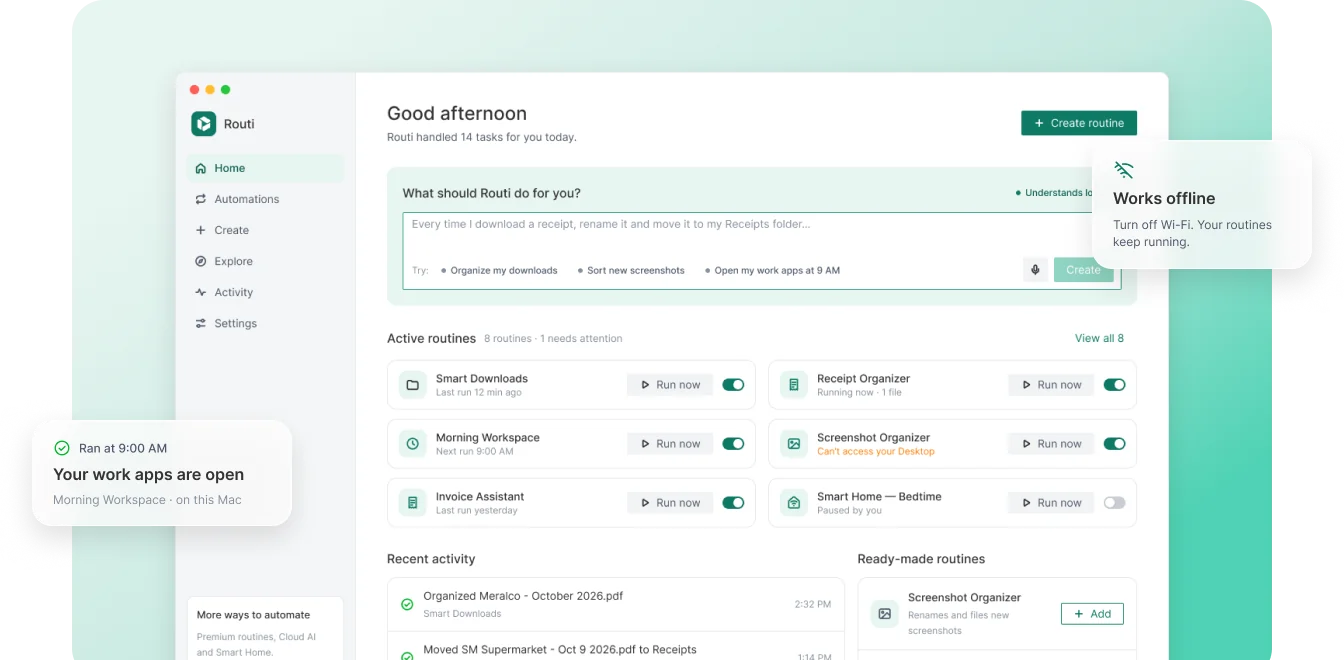
Routi handles the small things you do every day: opening your work apps, filing receipts, shrinking videos, setting up projects and backing up your work. Just say what you want. It all runs privately on your computer.
Requires a Mac with Apple Silicon (M1 or later) and macOS 12 or later.
Routi runs on Mac and Windows computers.
Requires Windows 10 or 11 (64-bit).
Stop doing the
same thing twice.
Opening the same apps every morning. Renaming files. Shrinking videos before you send them. Setting up folders for every new project. Small chores eat your day. Routi takes them off your plate.
How it works
Say it. Check it.
Forget about it.
No rules to learn, no flowcharts, no code.
“Every time I download a receipt, rename it with the store and date and move it to Receipts.”
Step 1
Describe it.
Type what you keep doing, in your own words. Routi turns it into clear steps right on your computer.
Step 2
Check the plan.
See every step and every folder it can touch. Test it on a real file first. Nothing runs until you turn it on.
Step 3
Let it run.
Routi works in the background, shows you exactly what changed, and tells you plainly when something needs you.
A day with Routi
A dozen chores.
None of them yours.
Real routines. All free, all running on your computer.
9:00 AM · Morning Workspace
Before
Opening Mail, Calendar, team chat and your Projects folder. Again.
After
Your workday opens itself, every weekday
Free · No AI needed
11:30 AM · Video Compressor
Before
Client demo.mov is too big to send
After
Client demo-compressed.mp4, saved beside the original
Free · Works offline
3:00 PM · Project Kickstart
Before
Projects › New Client is an empty folder
After
Briefs, Assets, Invoices and notes, copied from your template
Free · Works offline
4:45 PM · Safety Copy
Before
New work files with no backup
After
Copied to your Backup folder. Originals stay put.
Free · Works offline
Built to be trusted
with your files.
Private by design
Reads the details.
Not the internet.
Routi picks out the store, company and date from each file’s name right on your computer. Nothing is uploaded, and there’s no account.
Smart Downloads · just now
Works offline
Wi-Fi off.
Still running.
Local routines keep working with no internet. No account, no cloud, no waiting.

You’re in control
Your folders.
Your rules.
Routi asks for each folder it needs and shows exactly what it can change. Nothing is deleted outright: cleanups move files to the Trash, where you can restore them.
Every run, explained
See exactly
what happened.
Always nearby
Lives in your
menu bar or tray.

Ready-made routines
Start with one
that’s ready to go.
30 free routines for files, media, projects and your daily routine. Pick one, choose your folders, turn it on.
Browse routines ›Routi Pro
When you want more.
Everything above is free, for good. Pro adds more when you’re ready. One payment, no subscription.
$29 once (launch price)
See what’s in Pro ›Cloud AI
Summaries, outlines and smarter filing with your own OpenAI, Anthropic or Gemini key.
Smart Home
Say “Alexa, bedtime” and Routi runs your routine on this computer.
Messages
Results on your phone in Telegram, Discord or Slack. Text /backup and your computer does it.
Premium routines
Ready-made routines for digests, action items and more.
Let your computer
do the busywork.
Free for Mac and Windows. Mac: Apple Silicon (M1 or later) and macOS 12 or later. Windows: 10 or 11, 64-bit.